
Go to Section

Numbers
Take complete control over your numeric readouts with procedural precision.
Whether you are building a simple mechanical counter or a complex, high-tech dashboard, you can easily define exact digit lengths and manage decimal precision to perfectly match your project's data requirements.
The add-on intelligently handles negative values with a procedural minus sign toggle and offers smart quality-of-life features like automatically hiding leading zeros or snapping numbers to a clean left alignment. Capable of displaying values up to the hundred trillions, it effortlessly handles everything from basic readouts to massive data sets.


Alphanumeric
Unlock total creative versatility with the Alphanumeric Main Display, designed to seamlessly process single inputs containing both letters and numbers.
Perfect for recreating retro-digital interfaces, flight tracking panels, or custom UI elements, this feature lets you type naturally to generate your display.
Need to separate data points? Simply type a space between your inputs, and the add-on will automatically generate a custom separator exactly where you need it (supporting up to two inline separators). It is an intuitive, streamlined way to build complex, mixed-character displays without the headache of managing multiple text objects.

Time | Clock
Build realistic digital clocks effortlessly without messy node setups.
Choose your preferred time format and precisely control the readout by toggling seconds on or off.
You can automatically sync the clock's animation to your scene time with an adjustable start offset or use manual keyframing with custom multipliers to easily animate high-speed time lapses or stylized, non-linear time behaviors.
You can even reverse the flow of time by switching between clockwise and counterclockwise directions.

Time | Timer
Perfect for explosive countdowns or intricate digital chronometers.
Set your timer to count up from zero or down to zero, spanning across days, hours, minutes, and seconds.
For high-precision readouts, enable decimal times to display centiseconds, deciseconds, or milliseconds.
Like the clock, timers can be driven automatically by Scene Time or manually keyframed, and they feature a handy input multiplier so you can easily set massive durations (like a 24-hour countdown) without complicated math.

Time | Date
Quickly generate procedural calendar readouts with full formatting control.
Customize the exact order of your calendar units and choose between two-digit or four-digit year displays.
If you are utilizing the 16-segment model, you can even switch the month format from numeric to alphabetic, providing a more advanced and readable UI aesthetic for your digital interfaces.

Separators
It is the small details that sell the realism of an electronic display.
This add-on features a deeply customizable separator system to precisely format the spaces between your characters and digits.
Choose from a wide variety of built-in shapes, including colons for clocks, slashes for dates, dashes, diamonds, and triangles, or utilize customized procedural segment variations.
Beyond simply choosing a shape, you have absolute freedom over the styling. You can adjust corner roundness, tweak character angles, and perfectly dial in the horizontal and vertical positioning so every element sits exactly where your design demands.
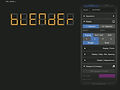
Display | Models & Styles
Establish the fundamental geometry of your digital asset.
Choose between the classic, retro-inspired 7-segment model or the highly detailed, alphanumeric-capable 16-segment model.
Tailor the physical structure to fit your specific scene by adjusting core parameters like segment thickness, the gaps between individual segments, and choosing between standard straight or italicized shear display angles.
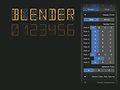
Display | Segment Fonts
Dial in the exact typographic style of your digital numbers and letters.
You can adjust the overall font width, compressing characters to half the display base or letting them fill the full width.
The add-on also provides stylistic font alternatives for 7-segment-specific numbers (like 6, 7, and 9) and dedicated alphabet alternatives for the 16-segment model, giving you the flexibility to perfectly match real-world electronic references.

Display | Align, Spacing & Size
Keep your layouts perfectly organized and precise. Control the exact horizontal and vertical alignment of the display's origin for easy snapping and positioning within your 3D models.
Fine-tune the micro-spacing between characters, whole digits, and decimals.
You also gain absolute control over the scale and manual vertical positioning of decimal points and minus signs to match your exact design intent.

Render Engine: Cycles
Display | Appearances
Bring your displays to life with fully procedural, render-ready materials.
Effortlessly switch between bright, light-emitting LEDs with adjustable emission colors and strengths, or a sleek, unlit monochrome LCD aesthetic.
For maximum realism, customize the physical display base by adjusting its Z-offset and overall thickness. You can even independently style the base's top and side colors for both emitting and monochrome states, ensuring the asset seamlessly integrates into your unique scene lighting.
FAQ
Segment Display
Edition Comparison
FEATURES | LITE | PRO |
|---|---|---|
License Activation Seat | 🖥️ | 🖥️🖥️ |
Future Updates/Upgrades | Hotfixes Only | ✓ |
Input Hover Descriptions | Short Info | Detailed Explanations |
Add-on Support | Social | E-mail |
User Manual | ✕ | ✓ |
Numbers
Input Options | Simple | Simple / Complex |
Display Length | 6 | 8 / 15 |
Toggle Decimals | ✓ | ✓ |
Decimal Length | 2 | 4 / 8 |
Place Value Separation | ✓ | ✓ |
Hide Leading Zeros | ✕ | ✓ |
Numbers Left Align | ✕ | ✓ |
Time
Time Options | Clock / Date | Clock / Timer / Date |
Toggle Seconds | ✓ | ✓ |
Clock Time Format | ✓ | ✓ |
Clock Animation | Auto (Scene Time) | Auto / Manual | Time Direction |
Timer Options | ✕ | ✓ |
Date Format | ✓ | ✓ |
Date - Month Format | ✕ * | ✓ |
Date - Year Format | ✓ | ✓ |
Alphanumeric
Display Count | Single | Up to 3 |
Display Length | 6 | 16 |
Input Align | ✓ | ✓ |
Input Options | Single Input | Single / Multi (Presets) Input |
Separators In Between ** | Characters | Characters / Displays |
Separators
Characters | 3 | 7 |
Shapes | 2 | 5 |
Shape Options | Limited | Full |
Separators In Between ** | Characters | Characters / Displays |
Display
Segment Display Models | 7-Segment | 7 / 16 Segment |
Model Styles | Single | Single *** |
Segment Fonts | Numbers Only | Numbers & Alphabet |
Appearances | ✓ | ✓ |
* Month format: Numbers or alphanumeric. The alphanumeric format is only compatible with the 16-segment display model, which is only included in the Pro version.
** Separators In Between: Locate the "Separators" panel. Because of the alphanumeric display count limitation in the Lite version, this feature is only available in Segment Display Pro.
*** Model Styles: More styles will be available in future updates for Segment Display Pro.
Will be available soon
Will be available soon
Get Release Updates
No spam, no boring weekly newsletters.
We will simply send you release-related updates for the Segment Display add-on